
Make your design system AI-ready
What we actually built at Eno so that agents stop guessing. A catalog they can read, conventions they cannot break, and a way to say what is missing.
During launch week at Eno, we shipped 143 screens. Sixty-eight of them came out of a single stretch of twenty hours. Nobody typed most of that code. Agents did, working from the design system Maxime Podgorski, Thomas Eyaa and I work on.
That number opened the talk Maxime and I gave at Hexa in September, and speed is what everyone asks about. The numbers are our own count, not a benchmark, so read them as orders of magnitude. Speed is not the part worth copying anyway. What made the speed possible is a set of unglamorous decisions about where knowledge lives, what the machine is allowed to do, and what happens when it reaches the edge of what we wrote down. This is the long version: the files, the rules, the checks and the workflow, in enough detail to rebuild them in your own repository.




AI only guesses where your system is silent
Ask an agent to build a screen and watch where it goes wrong. It invents a blue that exists nowhere. It rebuilds the button you shipped last year. It ignores your spacing scale, picks the wrong component with total confidence, restyles a table you already have. And it never once says “this is missing”.
Every one of those failures has the same shape. The agent reached a point where the system had no answer it could find, and it filled the silence with the most plausible thing it knew, which is whatever most design systems do. Plausible is the problem. A wrong answer that looks right ships.
Strip away the specifics and an agent building interface only ever asks three questions:
- What am I using here?
- What am I not allowed to do?
- What happens when the answer doesn’t exist?
Most design systems answer the first one, partially, in a documentation site written for people. Few answer the second in a form a machine has to respect. Almost nobody answers the third, which is why the agent improvises.
One distinction first, because it decides what “answering” means. A rule that lives in a wiki is something the agent may read. A rule that lives in the types, the linter or CI is something it cannot get past. We use both on purpose: documentation for intent, enforcement for anything expensive to get wrong. The test for which side a rule belongs on is simple. If a reviewer would need more than a minute to catch an agent breaking it, it does not belong in prose. The rest of this article takes the three questions in order, because that is the order in which we built the answers.
What am I using here?
The first job is to make the system findable by a reader that has no hallway to walk down and no colleague to ask. That reader starts every session from zero. Whatever it needs has to be in the repository, in a place it will look, in a form it can parse.
Start with where the instructions live. Our team uses more than one agent: Claude Code, Codex and Cursor, depending on the person and the task. The trap is writing instructions for one of them. Copies drift, and soon three tools work from three slightly different versions of the truth.
So there is exactly one source. AGENTS.md at the root is vendor-neutral and holds everything that is true whatever the tool. CLAUDE.md is a single line that imports it. Skills, rules and commands live in a neutral .agents/ folder, and each tool’s own folder points into it.
CLAUDE.md          @AGENTS.md
AGENTS.md          rules true for every agent
.agents/rules/     each loaded only for matching paths
.agents/skills/    one tree, linked into each tool
.claude/skills/*   symlinks, never real files
That last line is enforced, not hoped for. A hook refuses any skill created directly under .claude/skills/, and its message explains that the other tools would never see it. Without the hook, the convention would have lasted a week.
Rules are scoped by path. A rule about component internals declares that it applies to packages/ui/src/components/**, and it loads only when the agent touches those files. That matters more than it sounds. An agent with every rule in context at once follows each of them worse. Twenty focused rules that each arrive at the right moment beat one root file that tries to say everything.
Next to AGENTS.md sits DESIGN.md, the design language written for the machine. Its first line is addressed to agents: read this before writing any UI code. It lists every token with its light value, its dark value and, above all, its usage. A value without a usage is a palette. A value with a usage is a decision.
The difference shows on the smallest decision there is. Asked for secondary text, an agent can write three things.
text-[#6B7280]          a value
text-gray-500           a palette step
text-muted-foreground   a decision
Only the third survives a rebrand, a dark mode or a contrast fix without someone auditing every usage by hand. The file exists to make the third the only obvious answer, and it carries the warnings an agent needs and a person usually doesn’t. Ours includes one we learned the hard way: match on usage, never on value. An agent that reads #6B7280 in a design and finds a token with exactly that value will use it, even when that token means something else entirely.
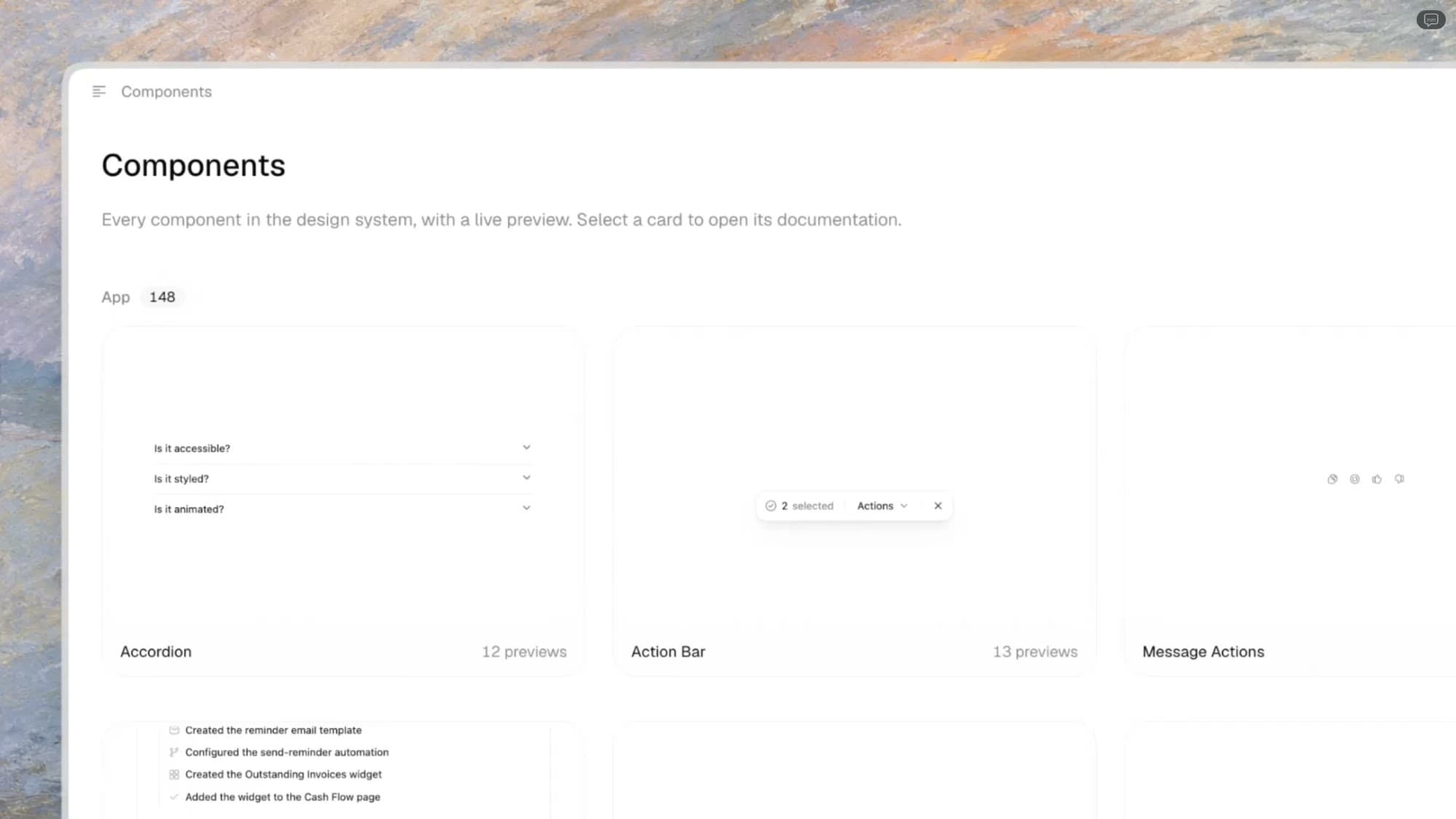
Then the catalog. Documentation pages are written for someone browsing. An agent does not browse, it queries. So every component example in our system is two files: the example itself, and a small metadata file beside it.
The metadata answers four questions: what it is called, what kind of thing it is, when to use it, and whether it can be trusted.
// filters/date-range.meta.ts
export default patternDef({
  name: "Date range filter",
  type: "pattern",
  usage: "Filter a list over a period. One date: DatePicker.",
  status: "stable",
})

// filters/saved-views.meta.ts
export default patternDef({
  name: "Saved views",
  status: "missing",
  issue: 412,
})
Status does the most work. Ours runs through missing, experimental, needs-review, needs-rework, stable and deprecated. An agent that finds a deprecated pattern knows not to reach for it. One that finds missing knows the system has acknowledged the gap and is not expected to improvise around it. A missing pattern renders as a placeholder card in our docs, linked to its issue, so people see the same hole the machine does.
Two rules keep the catalog honest. The examples are the documentation: no hand-written code samples in MDX that can drift from what actually renders. And CI regenerates the registry on every pull request and fails if it differs from what is committed, or if a component has no metadata file.
The catalog holds a few thousand of these files today. Nobody writes them by hand. A small command line creates, lists, verifies and bulk-edits them, and agents use it like any other tool. People read the same files, rendered.
What am I not allowed to do?
Documentation tells an agent what you would like. It stops nothing. The second question needs answers that hold even when the agent did not read, misread, or decided it knew better. Good systems already hold people to this. Agents make it non-negotiable, because they produce more code, faster, with less hesitation.
Tokens come first. Semantic names are one layer. The second makes raw values impossible to sneak in unannounced. A CI step audits every color class in the codebase and fails on any raw palette step, like text-gray-500, outside the token layer. Arbitrary values are allowed only where no token exists, and only with a comment saying why. When a design brings in a value with no matching token, the agent is told to stop and ask: either the system gets a new token, or the exception gets documented. Never a silent literal.
We also test the token layer itself, and only that layer. Tests that assert component styling are forbidden: they break on every refactor and prove nothing a visual diff doesn’t already show. Token tests check that a status color aliases the right scale in both themes, and that hover surfaces stay inside their contract. Prose cannot hold that kind of rule. A test can.
Then lint. A lint error is a message to whoever reads it next, and today that is usually an agent. Most lint messages say what is wrong. Ours say what to do instead, and where to go when the right answer does not exist.
// What most configs say
message:
  "Do not import lucide-react. " +
  "It is not an approved library.",

// What ours says
message:
  "Use @acme/icons. " +
  "No match? Log the gap, do not substitute.",
The first version produces an agent that swaps one unapproved icon library for another. The second produces either the right icon or a logged gap.
Do not import lucide-react. It is not an approved library.
@heroicons/reactLint passes. Still off the system.
Use @acme/icons. No match? Log the gap, do not substitute.
@acme/iconsLint passes. On the system at once.
Lint exceptions follow the same logic. When one is real, it lives in a test, one entry per file, each with its reason. An exception without a reason is a precedent waiting to be copied.
Then the moment before a tool call. Agents run tools, which gives us one more place to enforce: the moment before the call. Our hooks refuse a handful of actions outright. Editing generated files. Committing on main. Writing outside the current worktree. Skipping validation with --no-verify.
Each refusal is written as an instruction, because the agent will read it and act on it.
Blocked: --no-verify skips the checks that protect
main. Fix the failing validation, then commit again.
A refusal with a next step costs the agent one turn. A bare “denied” costs it several turns of creative workarounds, which can be worse than not blocking at all.
Last, how we write the rules in the first place, which took longest to learn. An agent complies with the letter of a vague rule and routinely misses its intent. “Use appropriate spacing” is satisfied by any spacing. “Make sure it looks fine” is satisfied by anything that renders.
So our rules may not use words that invite interpretation: appropriate, expected, consider, if needed, use your judgment. Every rule has to resolve to something mechanical: a binary condition, a pattern you can grep, a number, an explicit list. If we cannot write it that way, it is not a rule yet. It is a conversation the team has not finished.
And we write down only what the agent would get wrong by default. Anything it can learn by reading the code does not need a sentence, and every sentence that does not need to be there dilutes the ones that do.
What happens when the answer doesn’t exist?
This is the question that changed the most for us.
Every system has gaps, and a tight system has a specific way of failing at them. An agent that cannot find the component and cannot break the rules will build something that technically complies. A raw <button> styled with the right tokens. A table assembled from primitives that nearly matches the one you have. It passes every check, and it is a workaround that will be copied into the next ten screens.
This is what separates three kinds of system. In most systems, the agent may not find the right component, and nothing stops it from ignoring the one it finds. It guesses. In good systems, the wrong choice does not compile, because conventions are enforced rather than documented. It obeys. An AI-ready system adds one thing: it flags what is missing instead of inventing it, so you know exactly where your gaps are. It tells you.
Here is the same request made to each of the three.
Built a dropdown from a raw select, colored #6B7280 to match the filters.
The rule that makes the difference is three words: flag, don’t invent. Raw HTML is allowed only with a receipt, because sometimes the component really does not exist. The agent that reaches for a raw element opens an issue labeled for the design system and adds a line to GAPS.md, the gap index at the root of the component library. Today that receipt is checked at review, not by CI: /ship sweeps every diff for raw elements and reports them. Making a raw element without a gap entry fail the build is the obvious next step, and the first one we would recommend.
## Component gaps
- Saved views: list toolbar keeps filters (#412)
- Inline edit: table cells edit in place (#418)
Agents feed that index more than people do. It holds around eighty entries, each a real product need, logged at the exact moment someone needed it, linked to the raw element standing in for it. It is the most accurate design system backlog we have ever had, and nobody ran a survey to get it.
The index fails in one way worth naming: a gap that was not one, because the component existed and the agent did not find it. We treat that as a catalog bug, not an agent bug. The first question went unanswered, so the fix goes into the component’s metadata, not into the agent’s instructions.
The same instruction sits in every place an agent might improvise. Our root file says it in two sentences we point to more than any other: a blocker honestly reported is a good outcome. The patch is the failure.
A flagged gap is only worth something if it closes, and ours is meant to close the same way each time.
- The agent flags the gap instead of improvising.
- The flag becomes an issue carrying the screen that needed it.
- The component is built once, in the library, with its metadata.
- Visual regression proves nothing else moved.
- The changelog records the change and its reason on the component’s page.
The gap becomes a component, not a workaround.
CI is the last reader
The three answers hold only if something checks them on every change. Documentation can be skipped, and a local hook only guards the machine it runs on. CI cannot be skipped. It is the final gate, and the only reviewer that reads every line.
The gate is set before any code exists: every change to the system declares exactly one of four types.
- create: a new component or pattern.
- refine: visual only, no API change.
- extend: an additive API change, nothing removed.
- refactor: identical rendered DOM, identical public API.
The type sets the bar. A refactor has to produce byte-identical markup before and after, and we diff the HTML to prove it. A refine needs before and after screenshots. And when the work drifts from its declared type halfway through, a refine that starts touching props, it goes back to the spec instead of quietly becoming something else. That rule is our best defense against an agent improving things nobody asked it to touch.
The type says what kind of change it is. The blast radius says how far it reaches. A change to a component used twice and a change to a component used three hundred times are not the same change. A script counts consumers before anything merges, and the count sets the evidence required.
## Blast radiusSelect.tsx, 34 consumers
## Breakdown
Up to ten consumers, the standard checks are enough. Up to fifty, the change also needs screenshots of three of them. Beyond that, five, and a note from a human who looked. Consumers are sampled deterministically, evenly spaced by path (first, middle and last for three), so nobody, human or agent, gets to pick the ones that happen to look fine.
Then come the checks that run on every pull request, whatever its type. The palette audit runs. Lint runs with warnings treated as errors. Every documented component is rendered and pixel-diffed against main, in light and in dark. And a check warns when a touched component has no changelog entry, because a change nobody can trace is a stale decision in the making.
None of these checks is clever. Their value is that they run every time, on every change, whoever or whatever wrote it.
The workflow, end to end
The workflow around all this matters less than the three answers, so it gets one paragraph. Design reaches the agent from Paper through MCP, and every value is mapped to an existing token before a line is written. Pieces the system does not have are marked as missing in the layout, never quietly replaced. There is one way to open a pull request, a /ship command that reviews the diff for accessibility and design system conformance, then sweeps it for raw elements. One rule is worth stealing as is: a skill that learns from past sessions may write only to its own reference files, never to its instructions, because a skill that can edit its own rules can widen its own permissions.
Where the 20% lives
Back to launch week. 80% of the screens the agents produced shipped with edits of taste only, never of architecture.
The other 20% of screens is the interesting part. They raised 126 flags: 74 things to review, 32 to rework, and 20 components that did not exist yet. None of it was scattered at random. It clustered where the system said little or nothing, and nearly every flag was already an issue by the time we looked, because the agents had raised it.
The pace changed, because the agents stopped guessing: with several of them working in parallel, a screen took about five minutes of agent time. The judgment didn’t change. Taste is still ours. So is choosing what the system should become, and who gets a say. The agents made the gaps visible and cheap to find. Closing them well is still the job.
Start in three weeks
None of this needs our stack. The tools below are the common ones. Swap in yours.
And do not start where we are. Skip the blast radius tiers, the command line and the six statuses. Two statuses, stable and missing, carry most of the value, and the rest earns its place once the catalog is big enough to drift. Give the gap file an owner from day one, or it becomes a list nobody reads.
Week 1: describe the catalog
One metadata file per component: name, type, usage, status. One root file, AGENTS.md, telling every agent to read the catalog before it writes. If you already have a shadcn registry or Storybook, the metadata can live there. What matters is that a machine can query it.
Week 2: enforce it in CI
Tokens that carry a usage, declared in Tailwind’s @theme or your equivalent. Conventions moved out of prose into types and lint, with messages written for the agent that will read them. One check that blocks the merge, even if it is only Playwright snapshots.
Week 3: log what’s missing
One file where the agent writes what does not exist: the capability, the issue number, nothing else. A GAPS.md and gh issue create are enough to start. Within a month it can be the most honest backlog you have.
Then run the test that tells you whether it worked. Give an agent a real decision your team argued about last quarter, only the context you have written down, and one instruction: flag missing context, do not invent it. The skill below ships this as /readiness-check.
Which button does a destructive action in a modal use? Apply what is written, and name what you cannot determine.
If the answer applies your rule and names what it could not determine, the system is speaking. If it is fluent and generic, the system is still silent there.
We packaged the three weeks into a skill. It reads your repository first, works out your stack, and runs the same work in your context. An audit that scores where your system is silent. A setup that moves one week at a time and asks before deciding anything that is yours to decide. A way to log gaps instead of inventing around them.
npx skills add noemuch/skillsIt follows its own rule. When it cannot tell what your system means, it asks.
Ground your own system
FreeOne skill for Claude Code, Cursor and Codex. It audits your repo, sets up the three weeks one at a time, and asks about anything that is yours to decide.